-->

Wednesday, July 23, 2025

Qbasic program to find area of rectangle and circle using sub and function procedure | SEE computer science datafile program


QBasic programs collection-Especially for SEE (Grade-10)

QBasic procedure based programming  questions asked in Triton's model questions

QBasic programs [Triton's model set-I]

declare sub area_rectangle(l,b)

declare function area_circle(r)

Input "enter length and breadth of rectangle"; l, b

Input "enter radius of circle"; r

Call area_rectangle(l, b)

Print "the area of circle is"; area_circle(r)

End

Sub area_rectangle (l, b)

    area = l * b

    Print "the area is"; area

End Sub


Function area_circle (r)

    area_circle = 3.14 * r ^ 2

End Function


Tuesday, July 22, 2025

Qbasic program to read the contents of a datafile | SEE computer science datafile program


QBasic programs collection-Especially for SEE (Grade-10)

QBasic procedure based programming  questions asked in Triton's model questions

QBasic programs [Triton's model set]

'q9(b) triton SEE model set set II

Open "record.dat" For Input As #11

Cls

c = 0

While Not EOF(11)

    Input #11, sno, name$, address$, tel, email$

    If LCase$(Right$(email$, 9)) = "yahoo.com" Then

        c = c + 1

        Print name$, address$, email$

    End If

Wend

Print "total records having email is="; c

Close #11

End


Thursday, July 17, 2025

JavaScript Tutorial: Learn Functions and Arrow Functions with Examples


JS Function programs collection

JS program to show the concept of arrow function


1. Normal function to return an object
<script>
 function getUser () 
{
return{
//taking the braces in newline terminates the return so the
//followed statement does not work
  name: "Radhe krishna", 
  age: 25 
};
 }
document.write(JSON.stringify(getUser()));
//it converts the object into string with the help of stringify()
</script>


JS program using arrow function to return an object


<script>
 getUser=()=> 
{
return{
//taking the braces in newline terminates the return so the
//followed statement does not work
  name: "Radhe krishna", 
  age: 25 
};
 }
document.write(JSON.stringify(getUser()));
//it converts the object into string with the help of stringify()
</script>

Or


<script>
 getUser=()=> 
(
//() tells JavaScript: “This is  returning an expression.
  {
//taking the braces in newline terminates the return so the
//followed statement does not work
  name: "Radhe krishna", 
  age: 25 
}
 );
document.write(JSON.stringify(getUser()));
//it converts the object into string with the help of stringify()
</script>


Tuesday, July 15, 2025

JavaScript Tutorial: Learn Functions and Arrow Functions with Examples


JS Function programs collection

JS program to show the concept of arrow function


1. JS program to print hi using arrow function

<script>
s=()=>//same as function s()
{
  console.log("hi");
}
s();
</script>


2. JS program to print sum of two numbers using arrow function

<script>
sum=()=>//same as function sum()
{
  var a=30,b=20;
  return a+b;
}
console.log(sum());
</script>

Or

traditional way to use function

<script>
function sum()
{
  var a=30,b=20;
  return a+b;
}
console.log(sum());
</script>

3.JS program to print sum of two numbers using arrow function and passing parameters.

<script>
sum=(a,b)=>//means the function sum is accepting two parameters
{
  return a+b;
}
console.log(sum(12,13));
</script>


Or
<script>
sum=(a,b)=> a+b;//means the function sum is accepting two parameters
console.log(sum(12,13));
</script>


Note:We can not use return with a+b e.g. return a+b. Js does not support.
Use under braces. This is called implicit return. It means returning value without using return.

Monday, July 14, 2025

SEE Computer Science: sub procedure program – QBASIC Sub Procedure Program Explained-2081 BS


QBASIC programs collection

Sub  procedure program [Triton model question-2081 set V q5]

DECLARE SUB SENDUP (S$)

E$ = "NPABSON"

Call SENDUP(E$)

End

Sub SENDUP (S$)

    For i = 1 To Len(S$) Step 1

        If i Mod 2 <> 0 Then

            EE$ = EE$ + LCase$(Mid$(S$, i, 1))

        Else

            EE$ = EE$ + UCase$(Mid$(S$, i, 1))

        End If

    Next i

    Print EE$

End Sub


SEE Computer Science: sub procedure program – QBASIC Sub Procedure Program Explained-2079 BS


QBASIC programs collection- 2079 B.S. GP

Sub and function procedure program [Triton model question]


'rem q9 A 2079 GP

declare sub perimeter(l,b)

declare function area(l,b)

Cls

Input "enter length and breadth"; l, b

Call perimeter(l, b)

Print "the area is"; area(l, b)

End

Sub perimeter (l, b)

    p = 2 * (l + b)

    Print "the perimeter is"; p

End Sub

Function area (l, b)

    area = l * b

End Function


Sunday, July 13, 2025

SEE Computer Science: Triton Model Set II – QBASIC Sub Procedure Program Explained


QBASIC programs collection- Triton model sets-II 

Sub procedure program

DECLARE SUB SERIES ( )

Cls

Call series

End

Sub series

    A$ = "NEPAL"

    B = 1

    For I = Len(A$) To 1 Step -2

        If B <> 3 Then

            Print Mid$(A$, B, I)

        Else

            Print Mid$(A$, 1, I)

        End If

        B = B + 1

    Next I

End Sub


Qbasic program to use sub and procedure and to find volume and TSA | SEE computer science procedure program


QBasic programs collection-Especially for SEE (Grade-10)

QBasic procedure based programming  questions asked in Triton's model questions

QBasic programs [Triton's model set]

'q9 triton SEE model set set II

declare function volume(l,b,h)
declare sub TSA(l,b,h)
Input "enter l,b,and h"; l, b, h
Call TSA(l, b, h)
Print "the volume is"; volume(l, b, h)
End
Function volume (l, b, h)
    volume = l * b * h

End Function
Sub TSA (l, b, h)

    total_surface_Area = 2 * (l * b + b * h + l * h)
    Print "tsa="; total_surface_Area
End Sub

Qbasic program to read the contents of data file record.dat and to print on screen | SEE computer science datafile program

QBasic programs collection-Especially for SEE (Grade-10)

QBasic Datafile programming of questions asked in Triton's model questions


QBasic program read the contents of datafile and display on screen [Triton's model set]


'q9(b) triton SEE model set set II

Open "record.dat" For Input As #11

Cls

c = 0

While Not EOF(11)

    Input #11, sno, name$, address$, tel, email$

    If LCase$(Right$(email$, 9)) = "yahoo.com" Then

        c = c + 1

        Print name$, address$, email$

    End If

Wend

Print "total records having email is="; c

Close #11

End


Friday, July 11, 2025

c program to initialize a string with examples


 string programs in C

 // program to initialize a string in C


#include <stdio.h>

#include<string.h>

void main ()

{

char string[] = {'c', 'o', 'm', 'p', 'u', 't', 'e', 'r'};

printf("%s", string);

getch();

}


output:-


Friday, July 4, 2025

c program to reverse a string using function and pointer | pointer examples in c | program with pointer to character function


Pointer and string programs in C

 // program to reverse a string using function where we use pointer to character


//WAP to reverse a string using(strrev()) function.Pass string as parameter and return its reverse

#include <stdio.h>

#include<string.h>

#include<conio.h>

char *stringrev(char string[]);

/* function named stringrev() that accepts a string and returns

a char(i.e. pointer to character/string)

int main()

{

    char name[100];//string declaration

    printf("enter string\n");

    scanf("%[^\n]",name); 

    printf("reverse=%s\n",stringrev(name));//prints the name

    getch();

    return 0;

}

char *stringrev(char string[])

{

    strrev(string);

    return string;

}

Thursday, July 3, 2025

c program to use global variables | extern examples in c | C program to use multiples files using extern


global variables in C

 /* program to input a number from a different file using external variable and print that

*/

step1:

in devc++,

->click file menu

->click new

->project


-> click console application
->choose c project

->click ok

step 2


under 'main.c' write the code

#include <stdio.h>
extern int a;
void input();
int main() 
{
input();
printf("a=%d",a);
return 0;
}

-------

step 3

->right click the project folder on left side

->click new file as shown above . You can give a name you like
 Here we have taken as untitled3.c

->write the following code
#include<stdio.h>
int a;
void input()
{
 scanf("%d",&a);
}


->save it

->run the program


Monday, June 30, 2025

Qbasic program to read the contents of data file emp.dat and to print on screen | SEE computer science datafile program reading


QBasic programs collection-Especially for SEE (Grade-10)


QBasic Datafile programming of questions asked in 2080


QBasic program read the contents of datafile and display on screen SEE 2080 B.S.


Open "emp.dat" For Input As #12

While Not EOF(12)

    Input #12, name$, address$, gender$, salary

    If salary > 60000 Then

        Print name$, address4, gender$, salary

    End If

Wend

Close #12

End


Saturday, June 28, 2025

JavaScript Program to use function to find sum of series– Function concept in JS with Examples


JS Function programs collection

JS program to show the concept of function

JS program to find sum of series using function  sum()

<!DOCTYPE html>

<html>

<head>

<meta charset="utf-8">

<meta name="viewport" content="width=device-width, initial-scale=1">

<title>sum of series</title>

</head>

<body>

<h1>the sum is</h1>

<script type="text/javascript">

function sum()

{

var i,sum=0;

for(i=1;i<=100;i++)

{

sum+=i;

}

document.write(sum);

}

</script>

<script type="text/javascript">

sum();

</script>

</body>

</html>

Thursday, June 26, 2025

JavaScript Program to Use querySelector() – DOM Manipulation in JS with Examples


JS DOM programs collection


JS program to show the concept of querySelector()

<!-- In JavaScript, 
querySelector() is a method provided by the DOM (Document Object Model) that allows you to select the first HTML element that matches a specified CSS selector. -->
<!DOCTYPE html>
<html>
<head>
<meta charset="utf-8">
<meta name="viewport" content="width=device-width, initial-scale=1">
<title>DOM (queryselector)</title>
</head>
<body>
<p id="id1">hello DOM</p>
<script>
var txt;
txt=document.querySelector('#id1');
txt.style.color="green";
</script>

</body>
</html>

Wednesday, June 25, 2025

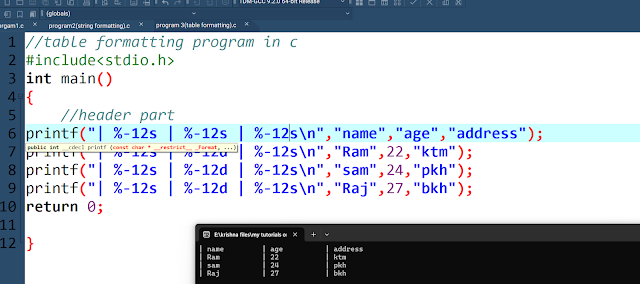
Table Formatting in C Programming with right and left alignment | Format Specifier Examples with Code


C program collection


C program to print the number in the formatted form

//table formatting program in c

#include<stdio.h>

int main()

{

//header part

printf("| %-10s | %-13s | %-11s\n","name","age","address");

printf("| %-12s | %-12d | %-12s\n","Ram",22,"ktm");

printf("| %-12s | %-12d | %-12s\n","sam",24,"pkh");

printf("| %-12s | %-12d | %-12s\n","Raj",27,"bkh");

return 0;

}

output:-

C program to format table


string Formatting in C Programming | Format Specifier Examples with Code


C program collection


C program to print the number in the formatted form

//string formatting in c program

#include<stdio.h>

int main()

{

char name[]="Radhekrishna";

char name1[]="krishna";

printf("name=%s\n",name);

printf("[%20s]-right alignment\n",name);

printf("[%-20s]-left alignment\n",name);

printf("[%.3s]-only three characters.\n",name1);

printf("[%s]-all characters\n",name1);

return 0;


}


C program to format the string


Number Formatting in C Programming | Format Specifier Examples with Code

 C program collection


C program to print the number in the formatted form


//number formatting in program

#include<stdio.h>

int main()

{

int num=3453;

float pi=3.141592;

printf("default=%d\n",num);

printf("10 character width=[%10d]\n",num);

printf("left aligned:[%-8d]\n",num);

printf("default:%f\n",pi);

printf("10 width with 4 decimal:[%12.4f]\n",pi);

printf("exponential form:%.3e\n",pi);

return 0;

}


c program to format the number in output


Friday, June 20, 2025

JavaScript Program to Use getElementsByTagName() to change the color of paragraphs | DOM Manipulation in JS with Examples


JS DOM programs collection


JavaScript Program  to change the color of different paragraphs  using getElementsByTagName(DOM)


<!DOCTYPE html>

<html>

<head>

<meta charset="utf-8">

<meta name="viewport" content="width=device-width, initial-scale=1">

<title>color of different paragraphs</title>

</head>

<body>

<p>text1</p>

<p>text2</p>

<p>text3</p>

<p>text4</p>

<button onclick="highlights()">click to highlight the paragraphs</button>

<script>

function highlights()

{

let i;

item=document.getElementsByTagName('p');

for(i=0;i<=3;i++)

{

item[i].style.backgroundColor="orange";

}

}

</script>


</body>

</html>

JavaScript Program to Use getElementById() to change the color of paragraphs with different ids | DOM Manipulation in JS with Examples


JS DOM programs collection


JavaScript Program to Use getElementById() to change the color of different paragraphs having different ids  using getElementById (DOM)


<!DOCTYPE html>
<html>
<head>
<meta charset="utf-8">
<meta name="viewport" content="width=device-width, initial-scale=1">
<title>looping through multiple ids</title>
</head>
<body>
<p id="i1">text1</p>
<p id="i2">text2</p>
<p id="i3">text3</p>
<p id="i4">text4</p>
<button onclick="highlights()">click to highlight the paragraphs</button>
<script>
function highlights()
{
let i;
for(i=1;i<=4;i++)
{
item=document.getElementById('i'+i);
item.style.backgroundColor="orange";
}
}
</script>
</body>
</html>